How to Edit Your Digital Business Card and Check Updates
If you need to make any changes to your Digital Business Card (DBC), simply log in to your Afri54
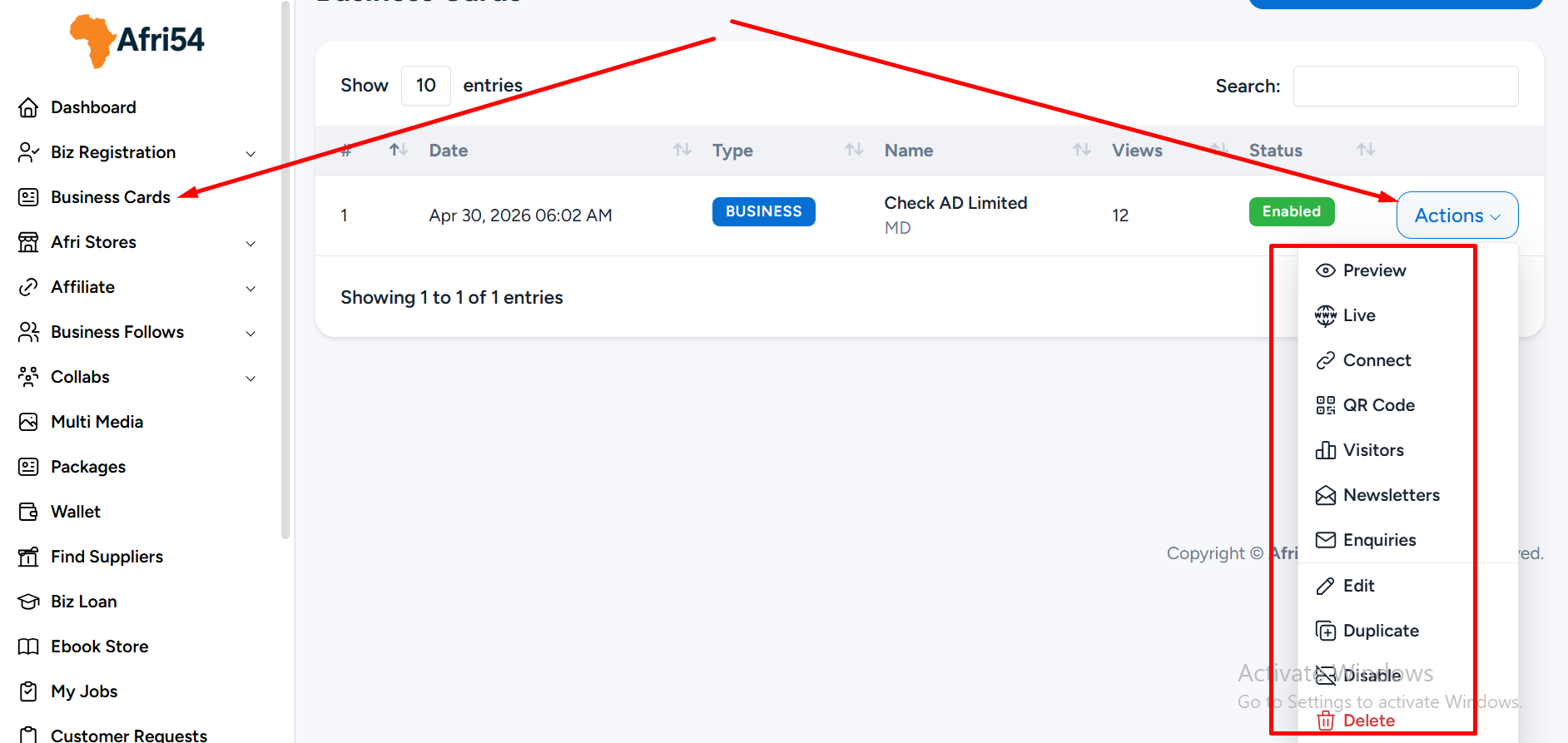
Business Dashboard and follow the steps below:
*Navigate to Business Card on the left-hand menu.
*Click the Action button to view the list of available features.
Below is an explanation of each feature:
a. Preview
This allows you to view how your Digital Business Card currently appears while making updates. Please note that this is not your live DBC link.
b. Live
This is your official Digital Business Card link. It displays your card in live mode and can be shared with friends, clients, or on social media once your setup is complete.
c. QR Code
You can download and share this QR code anywhere. When scanned, it directs users straight to your Digital Business Card.
d. Visitors
This section shows all visitors to your DBC. Afri54 tracks visitor data such as visit time, IP address, and browser type, helping you understand your audience better.
e. Newsletter
Here, you can view all email subscriptions collected through your DBC newsletter feature.
f. Enquiries
This displays all messages submitted through the contact form on your Digital Business Card.
g. Edit
One of the most important options, this allows you to modify and update your Digital Business Card.
h. Duplicate
This feature enables you to create a copy of your existing DBC. Please note that duplication is not available on Free or Starter plans, as these plans support only one DBC. This feature is particularly useful when creating multiple cards with similar content.
i. Disable
When you upgrade from a Free plan to a Paid plan, your DBC may be automatically disabled. You will need to re-enable it to make it visible online again.
j. Delete
This option permanently deletes your Digital Business Card and your listing on Afri54. Please use this feature with caution, as this action cannot be undone.
Found this helpful?
( 11 out of 22 found helpful )